
.png)
Taíno World
Educating Taíno culture through interactive learning
UX Writing | UX/UI Design | Research
OVERVIEW
Client
Casa Areyto - Home for Taíno Indigenous language and culture and culture information.
User
Taíno descendants and individuals with a specific interest in the Taíno language, culture, community, or history
My Role
Content Designer & Developer
Timeline
6 months (December 2024, May 2025)
Tools
Figma · Notion · Wix · Fathom · Trello · Google Docs · Maze
Key Deliverables
Content Style Guide
Asset List
Island Accessibility Audit
Tanama Tone + Voice Guide
Problem
The history and culture of the Taíno people are not widely known, and many descendants struggle to find accessible resources to reconnect with their heritage.
Solution
An interactive conference landing page designed to share and preserve the living history of the Taíno people. A resource that continues even after the conference is over.

Project Summary:
In late 2024, I joined TechFleet, a nonprofit that connects early-career UX professionals with real-world projects. I was selected to join the final phase of Taíno World, a multi-phase initiative focused on preserving and revitalizing the language, traditions, and identity of the Indigenous Taíno people.
Our goal was to create an immersive, educational landing page for the upcoming 2025 Taíno Conference, themed “We Are Connected.” This annual virtual gathering raises awareness of Taíno heritage and fosters community among Taíno descendants and allies.
My Contributions:
-
Content Design: finalized content for the main landing page and two interactive island pages:
-
Borikén (Taíno writing)
-
Kuba (Taíno spirituality)
-
-
Style & Voice: co-authored the Tanama Tone & Voice Guide, ensuring respectful, consistent language across the site.
-
Asset Management: organized image and media libraries, verifying all usage rights and licenses.
-
Accessibility: conducted a light-touch audit of the “islands,” improving contrast, hierarchy, and clarity for diverse users.
Project Stakeholders:
As part of the content design team, I collaborated virtually with three other UX writers and worked cross-functionally with over 30 teammates, including:
-
UX designers
-
UX researchers
-
3D artists
-
Product managers
-
Developers and QA specialists
Project Outcome:
Developed reusable resources, including a content style guide and a licensed asset library, to support long-term client needs.
Improved accessibility for users by identifying and addressing 16+ accessibility issues
Finalized content for the main landing page and 2 interactive island pages
Finalized Taíno conference interactive experience:


RESEARCH
Google LM Notebook
Context
I joined the project during its final phase, where we were responsible for building on a year’s prior research and completing the product. Because TechFleet rotates teams every six months, most of the team—including the content design leads—were also new.
We inherited a large archive of client resources and internal research materials, including detailed Notion boards, lengthy Google Docs and Figma files, and long-form client-provided media like hour-long Spanish lectures. The sheer volume made onboarding time-consuming and overwhelming, especially under tight deadlines.
My Role
I developed an internal AI-powered tool using Google LM to make reviewing all the relevant documentation less overwhelming. It compiled and summarized essential documents, video transcripts, and client-provided materials into a searchable database.
This tool allowed me to:
-
Quickly surface key takeaways and insights from past research
-
Fact-check sensitive cultural content during copy revisions
Although originally designed for the content design team, I shared it as a resource for the entire cross-functional team.

Island Teams
Context
In previous phases, teams worked in silos, limiting cross-team collaboration. To address this in the final phase, the leads created mixed mini-teams with both content designers and UX designers for each island page.
I was part of two mini-teams, each consisting of two designers and one other UX writer:
-
Borikén – Taíno Writing page
-
Kuba – Taíno Spirituality page
Our goal was to redesign the pages based on client feedback, shorten the content, and incorporate interactivity based on user testing.
My Role
-
Borikén Page:
-
Collaborated with the other UX writer to condense and clarify content
-
Combined sections and reworded content to emphasize the relevance of Taíno language and culture today
-
Suggested adding flippable card elements for the Taíno artifact section (researched and tested in Wix, received positive feedback)
-
-
Kuba Page:
-
Worked with the other UX writer to review and rewrite content for clarity, shortening sections as per client feedback.
-
Examples of UX writing done for the Borikén page:

I worked with another UX writer to shorten and simplify the original Borikén page content, based on client feedback.

User testing showed that users expected the images on the Borikén page to be interactive, so we needed to find a solution within Wix’s constraints.
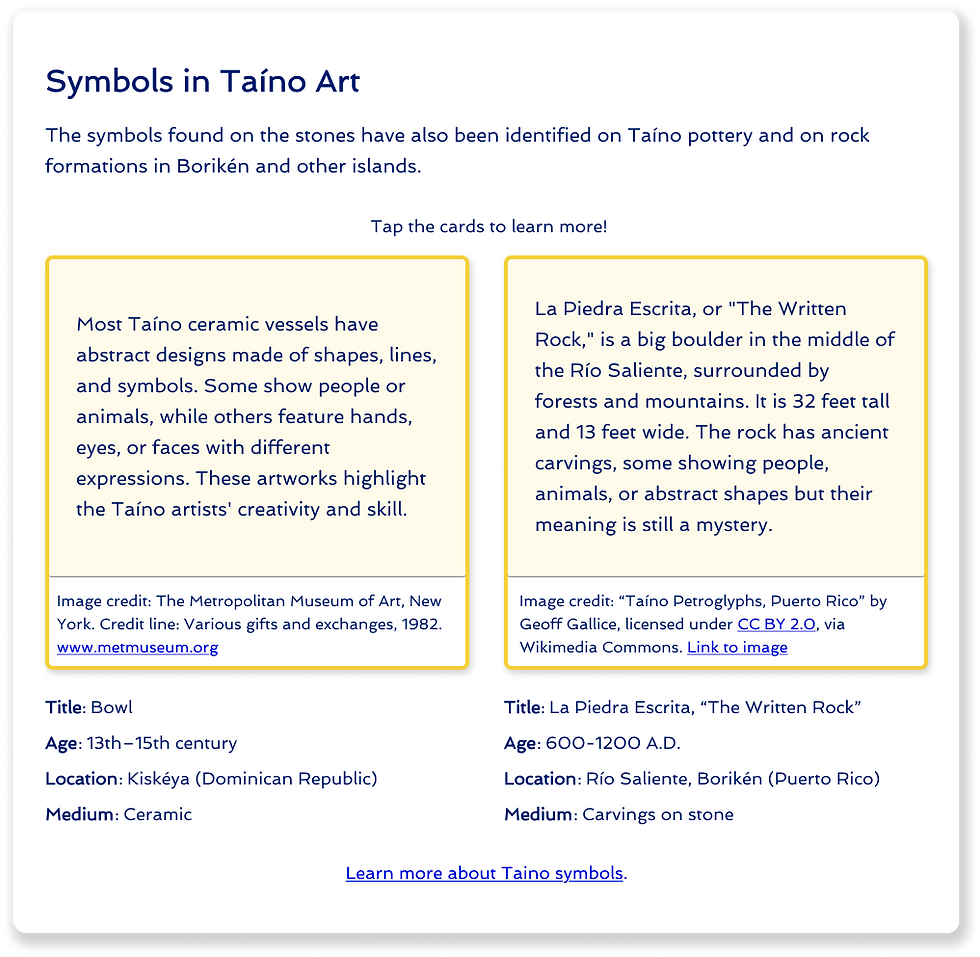
To avoid copyright issues, I explored ways to add attribution text under the images and made sure they worked within Wix’s limitations.
I worked with another UX writer to shorten and simplify the original Borikén page content, based on client feedback.
UX WRITING

Evolution of Tanama's interactions

I went through each section of the website and thought about what extra detail could make it more interesting or fun for users.
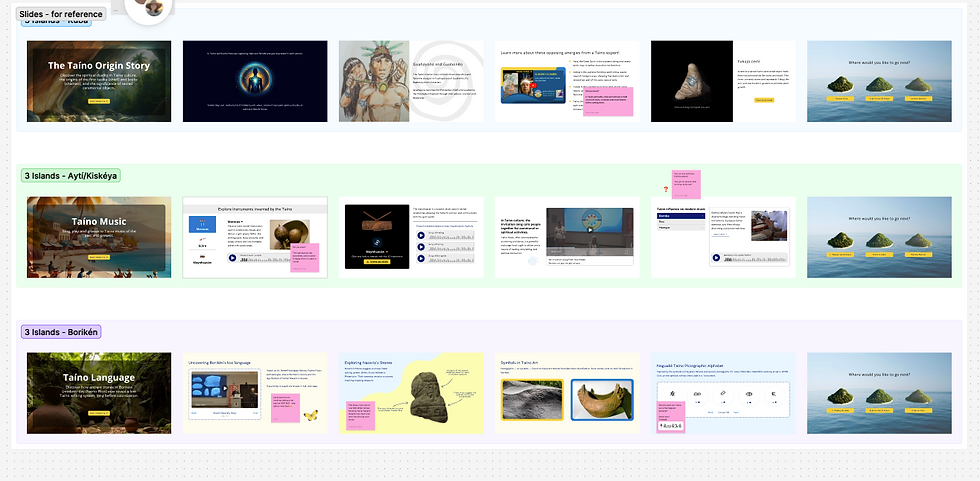
I cross-checked my research with the client’s resources to make sure everything was accurate, then repeated the process for the rest of the island pages.

To guide future content in Tanama's voice, I created a voice guide based on client feedback and research from previous conference attendees.
I went through each section of the website and thought about what extra detail could make it more interesting or fun for users.
Bringing Tanama to Life
Context
The client wanted a golden butterfly guide named Tanama to accompany users as they navigated the website. But at first, the idea was pretty open-ended—even the client wasn’t sure exactly what Tanama should look like, sound like, or how she should show up on each page.
The team needed to define Tanama’s personality, tone, and role in a way that felt meaningful and engaging, while also designing interactions that worked within the limitations of the client’s Wix platform.
My Role
-
Proposed a fun fact interaction to help Tanama evoke joy and delight for conference attendees.
-
Wrote 6 fun facts tailored to each island page, informed by research and client input.
-
Created a Tanama voice guide based on research from previous conference attendees.
Client feedback from in-progress demo meeting:
“Yes, I love this whole idea. Oh my god, Tanama is like a little version of me! This is what I want!" (2.2.25)

AI Design Collab
Context
On the Kuba island page, there was a section about the Taíno belief in the balance of masculine and feminine energies. The client didn’t like the background image—she felt it was too dark and preferred using nature to represent Taíno spirituality instead of people.
User testing also showed that while some users appreciated the concept, 60% of the users found the wording unclear and needed a more straightforward explanation of what "energies" meant.
My Role
-
Researched natural symbols linked to the Taíno ancestral spirits of femininity and masculinity
-
Collaborated with 3D designer to create a new AI-generated background based on the research
-
Rewrote copy to clearly explain the balance of masculine and feminine energies using nature-based examples
Collaborative evolution of the Taíno spirituality section


I worked with the UXW and 3D teams to create images that better matched the client’s desired natural elements and slide content.

We kept the animal symbols from my research and used my revised copy in the final product.

Examples of information architecture copy edits


Asset List
Context
As the project progressed, it became clear we needed a better system to organize media assets like photos and videos. Some images were only placeholders, others hadn't been checked for copyright issues, and everything was scattered across different files. This made it difficult to track how many images we needed, which ones had to be replaced or recreated, and what required communication with other teams.
The project needed a central resource to manage all media, identify what was still needed, and track image licenses.
My Role:
-
Researched and cataloged 10+ image assets, ensuring correct licensing for each.
-
Designed layouts for image attributions on the website, ensuring feasibility through testing in Wix Editor.
-
Created a pronunciation library to collect and manage audio clips for hard-to-pronounce words on the website.
ASSET MANAGEMENT

Accessibilty Audit
Context
Halfway through the project, the UX Design team asked UX Writers to run an accessibility audit alongside their usability review. Each writer reviewed a page from another team to offer fresh, unbiased feedback.
The Fix
We split the pages and audited for things like readability, contrast, structure, and alt text. Our findings were shared with the design and dev teams to guide final updates and improve accessibility site-wide.
My Role
-
Identified 16 accessibility issues on the Music Island page (Ayti/Kisikeya)
-
Provided recommendations for each issue to help the design and dev teams implement improvements.
Screenshot of accessibilty audit:

ACCESSIBILTY

Building pages on Wix
Context
I joined the development team toward the end of the phase when it became clear they needed help. With dev team members leaving right and left, we were at risk of not being able to implement the finalized designs on the website and completing the project.
The design-to-dev docs were comprehensive but complex, and since I wasn’t familiar with some of Wix’s features, I had to teach myself along the way. Thanks to UXD tutorials, I learned how to handle more advanced interactions. When the dev lead went on vacation, I took over to keep everything moving forward.
My Role
-
Finalized interactive components for the website in Wix
-
Completed the Ayti island page and oversaw the completion of other pages
-
Learned to use Wix's native elements and taught the team how to implement more complex user interactions
Examples of dev hand-off design docementation:


The click to play audio clip button was not a natural feature on Wix Editor. To implement this on the website, I learned some basic coding.

To bring Tanama’s quirky personality to life, I added custom interactions that made her feel more dynamic. I taught myself how to build these using Wix tutorials and creatively worked around platform limits.
DEVELOPMENT
OUTCOME
Developed reusable resources, including a content style guide and a licensed asset library, to support long-term client needs.
Improved accessibility for users by identifying and addressing 16+ accessibility issues
Finalized content for the main landing page and 2 interactive island pages
TAKEAWAYS
What I learned:
Set a clear client communication plan
Future projects should establish clear protocols at the outset for handling client unavailability, including decision-making autonomy for the team when timely feedback isn't possible.
Biggest challenges:
Lack of project management:
The project started without a PM team and had high turnover later. This slowed client communication and created confusion over who was responsible for updates. Non-PM teams (like UXD, UXW, and QA) had to step in to manage timelines and coordination.
Busy client
The client’s schedule made regular feedback difficult. Weekly question emails often went unanswered, delaying copy revisions and creating uncertainty across teams.
Lack of development team
With no developers early on and high dev turnover, the team had to take a more waterfall approach. UXD members researched Wix's feasibility, and QA/UXW volunteers helped with development tasks when needed.
What I'd do differently next time:
Establish a clear definition of done
Align early on around what “finished” means for each task (e.g., no spelling errors, verified information, alternative options explored, and peer review completed). This helps avoid rework and ensures consistent quality across teams.
Clarify team roles and responsibilities early
At the start of the project, clearly define the purpose and responsibilities of each team (UX Writing, UX Design, Product Strategy, Development, Research, QA, etc.). This ensures smoother collaboration and helps teams understand how their work connects to the bigger picture.
A thank you to the team...
This project would not have been possible without the time, effort, and expertise of the following volunteers. I’m grateful for the opportunity to collaborate with such talented and dedicated professionals and to learn alongside them.
Project team
UX Design:
-
Grace Roh, Daniel Seo, Ariel Kim, Maryam Rahmanifard, Angela Ruan, Namira Wicaksana, Theraune Casey
UX Writing:
-
Claire Ellison, Anik Ahmed, Bethany Gordan
Product Strategy:
-
Preet K. Sekhon, Marie Williams, Giuliana Wladessa Manca, Bryanna Mendez
Product Management:
-
Rohit Ramesh
UX Research
-
Malihe Eshghavi, Loreine Noble, Akshayakumar, Josie Robinson, Diana Moore, Andres Martinez, Nitika Sharma
3D Artists:
-
Jialu Li, Nadine Allan
Development:
-
Mike Kushman, Jaya Varma, LAWAL Olajuwon Waheed
QA:
-
Meenakshi Yadav
Thank you for reading my case study!
If you'd like to learn more about this project, feel free to contact me.
Or, check out more case studies below.
Prev Project
Next Project